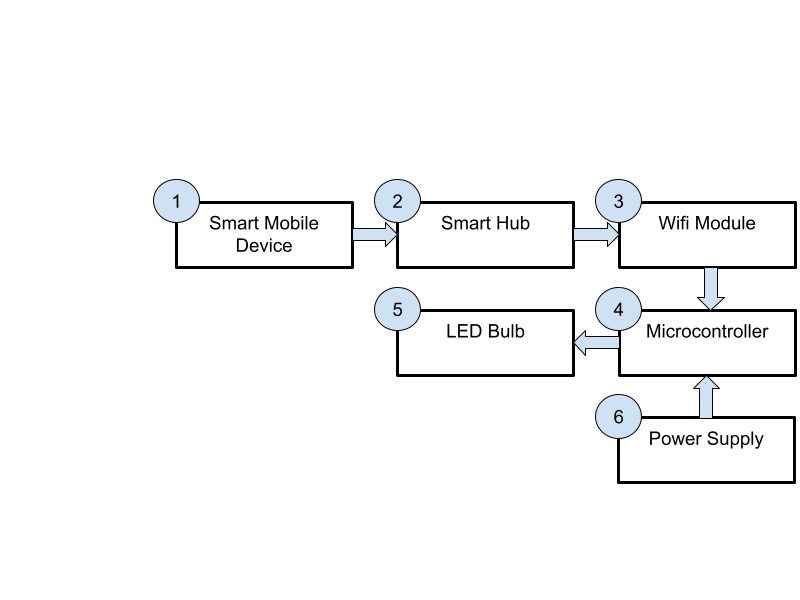
The Smart Light shall allow the resident and their caregiver to control the lighting of the smart home via a connection to the Smart Hub.
The Smart Light will consist of an LED light bulb socket connected to the Smart Hub wirelessly. The resident will be able to easily turn the light on and off from the Smart Mobile device using the kick button inputs. The caretaker shall be able to easily switch out the bulb in the event that it breaks. The light will be completely safe and not cause any overheating or fires.

Requirements
- The Smart Light shall have limited heat output to avoid starting fires.
- The Smart Light shall be wirelessly toggled through the Smart Hub.
- The Smart Light shall have the ability to change bulbs without replacing the full smart device.
- The Smart Light shall be able to be controlled through kick button inputs.
- The light bulb shall not burn out.
- The base shall be secure.
- All electronic components shall be enclosed.
Design
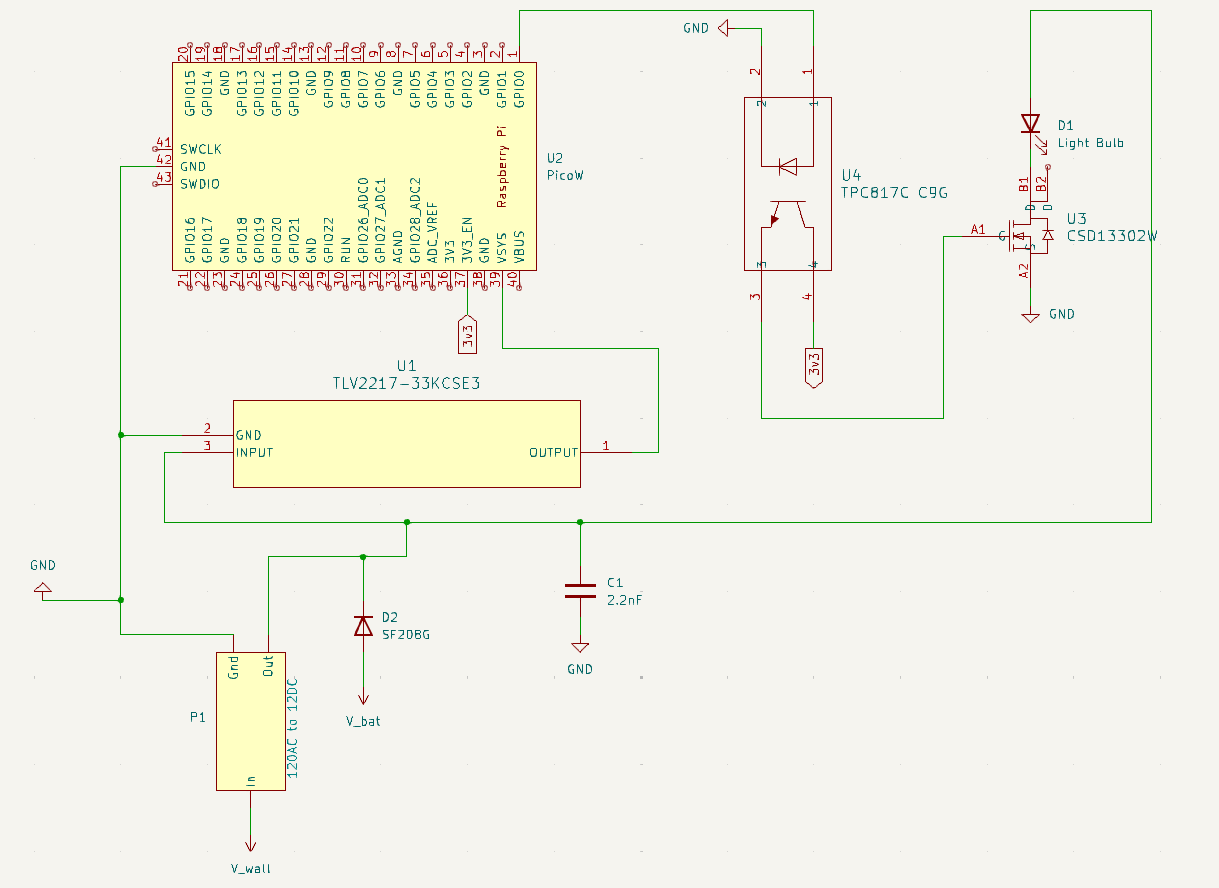
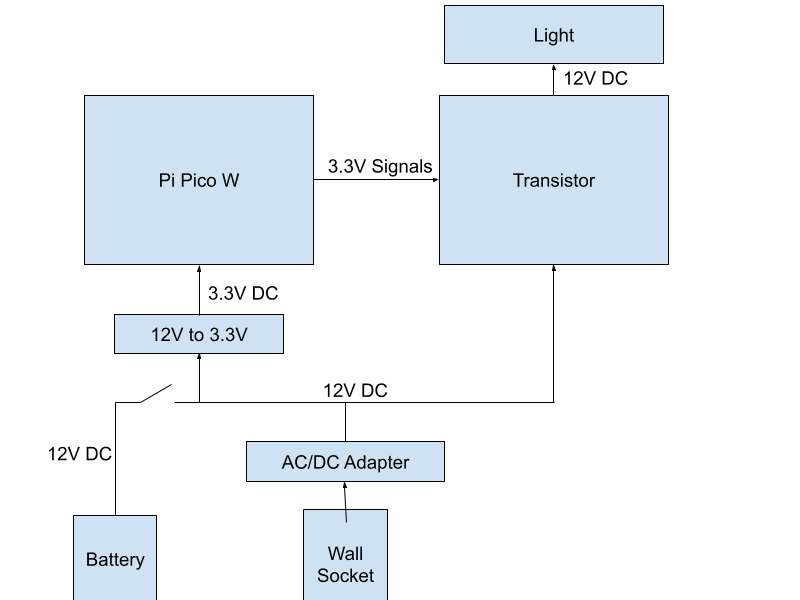
There is an AC to DC converter that takes power from the wall. A diode blocks the power from leaving the battery to go to the circuit if there is wall power. There is a capacitor stabilizing the circuit current for when the power source switches. A voltage converter steps the voltage of the system down to power the Pi Pico W. The Pi Pico W receives signals from the Smart Hub and uses those to send signals to the optocoupler to switch the transistor. The optocoupler is there to isolate the Pi Pico W from the transistor. The transistor switches to allow or disallow power to the light.
| Qty | Description | Unit Price | Total Cost |
| 1 | CSD13302W Mosfet | $0.27 | $0.27 |
| 1 | 12V Low Voltage LED Light Bulbs – Daylight 7W(Only for 12-36V) | $5.00 | $5.00 |
| 1 | TLV2217-33KCSE3 Voltage Regulator | $1.05 | $1.05 |
| 1 | TWDRTDD Porcelain Lamp Holder Socket | $8.99 | $8.99 |
| 1 | KBT 12V 1200mAh Rechargeable Li-ion Battery Pack | $16.99 | $16.99 |
| 1 | 2.2nF Capacitor | $1.06 | $1.06 |
| 1 | WSU120-0700 AC/DC Wall Adapter | $5.81 | $5.81 |
| 1 | SF208G Diode | $0.10 | $0.10 |
| 1 | PJ-063AH Power Jack | $1.98 | $1.98 |
| 1 | DIP-4 PC817C Octocoupler | $0.50 | $0.50 |
| 1 | PC604BR50 Surface Mount Adapter | $11 | $11.47 |
| 1 | PCB | $30 | $30 |
| 1 | Emergency PCB (Estimate) | $100.00 | $100.00 |
| 1 | Emergency Mechanical Design | $60 | $60.00 |
| Total | $245.07 |
Test Plan
Test T1 – Run Test:
Provide power to the Smart Light. Place a piece of paper on top of the light bulb. Turn on the light bulb. Time 30 minutes using a stopwatch.
Pass/Fail criteria: The paper is not burned and the light does not fall over.
Cover Requirements: 1, 5, 6
Test T2 – Connection:
Provide power to the Smart Light. Kick the Kick Buttons to wirelessly turn the Smart Light on. Kick the Kick Buttons to wirelessly turn the Smart Light off. Repeat five times.
Pass/Fail criteria: The light is responsive.
Cover Requirements: 2, 4
Test T3 – Replaceable:
Provide power to the Smart Light. Turn the Smart Light on. Turn the Smart Light is off. Unscrew the light bulb from the socket. Screw a new light bulb into the socket. Turn on the Smart Light.
Pass/Fail criteria: The light illuminates using both light bulbs.
Cover Requirements: 3
Test T4 – Presentation:
Visually inspect the device.
Pass/Fail criteria: No wires or electronic components are visible.
Cover Requirements: 7
| Requirements | |||||||
| Tests | 1 | 2 | 3 | 4 | 5 | 6 | 7 |
| T1 – Run Test | x | x | x | ||||
| T2 – Connection | x | x | |||||
| T3 – Replaceable | x | ||||||
| T4 – Presentation | x | ||||||